Short answer: we gave Seedream 5.5, Seedream 5.0 Pro, GPT Image 2 and Qwen Image 2.1 the same three prompts, one shot each. On a poster with seven blocks of text, Seedream 5.0 Pro, GPT Image 2 and Qwen Image 2.1 spelled every block correctly, and Seedream 5.5 got six of seven, adding a stray "10" to one of the times. In a scene with nine requested details, GPT Image 2 matched all nine, and each of the other three missed one or two. At 2K, Seedream 5.5 took 27 to 43 seconds per image, Qwen Image 2.1 35 to 37 and Seedream 5.0 Pro 50 to 74; GPT Image 2 took 92 to 117 seconds per 1024x1024 image at high quality. Seedream 5.5 also makes transparent images from a prompt alone and splits an image into up to 99 layers, and it bills less per image than Seedream 5.0 Pro. All four run on EmpirioLabs through the same image endpoint. Compare the results below; we are not declaring a winner.
Watch the comparison
Three prompts, run once on each model. Nothing was regenerated or edited. Watch it on YouTube.
Test 1: a poster with seven blocks of text
Prompt: A flat vector-style event poster on warm cream paper. At the top, the headline "NIGHT SKY FESTIVAL" in large bold navy capital letters. Directly under it, the subtitle "Telescopes, talks and star maps for all ages" in small italic serif type. In the center, a simple illustration of a crescent moon above three dark green pine trees. Below the illustration, a three-line schedule in navy sans-serif type: "Saturn viewing 8:00 PM", "Meteor talk 9:15 PM", "Star map workshop 10:00 PM". Along the bottom edge, the line "Hilltop Park, Saturday 14 March". In the bottom right corner, a round orange badge that reads "FREE ENTRY".
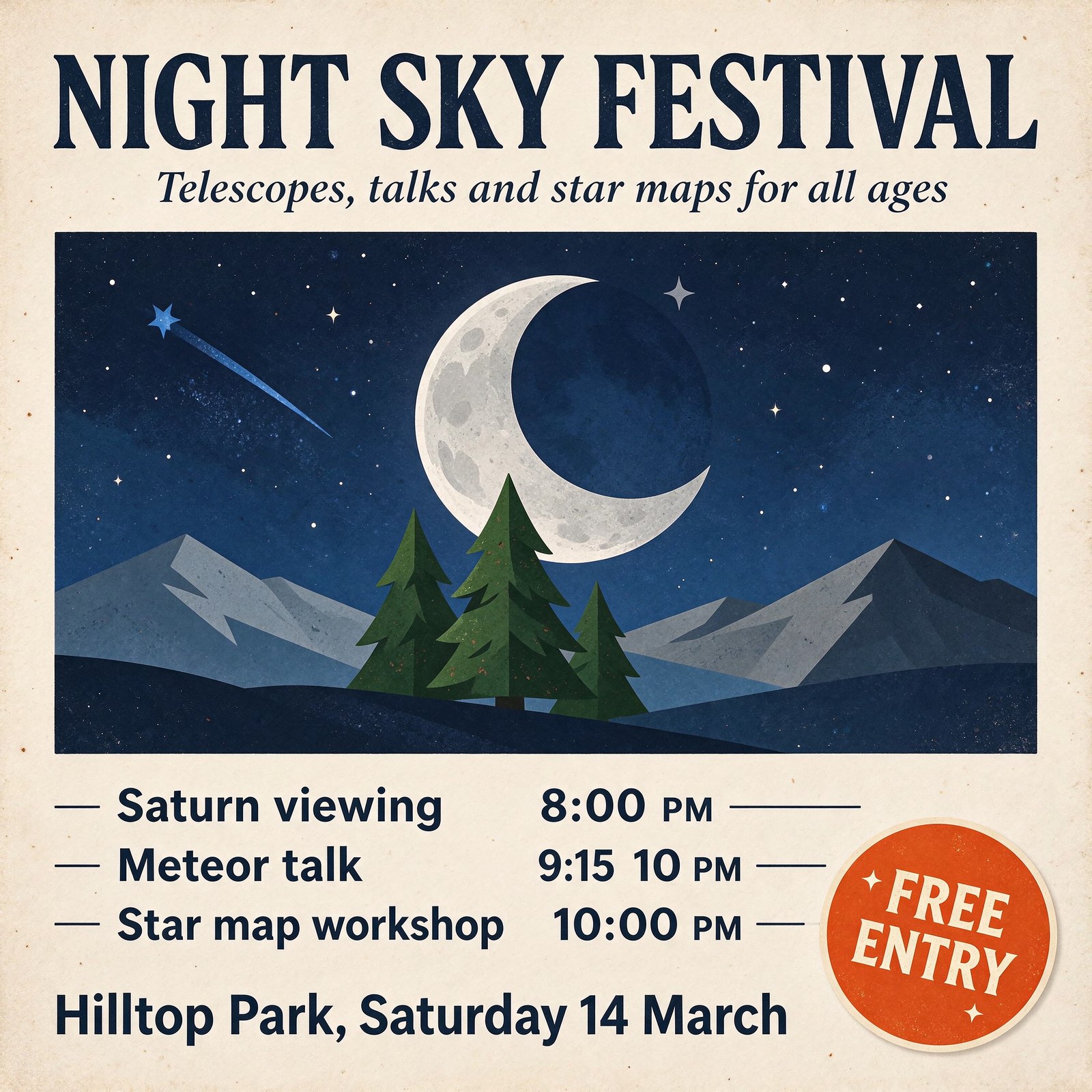
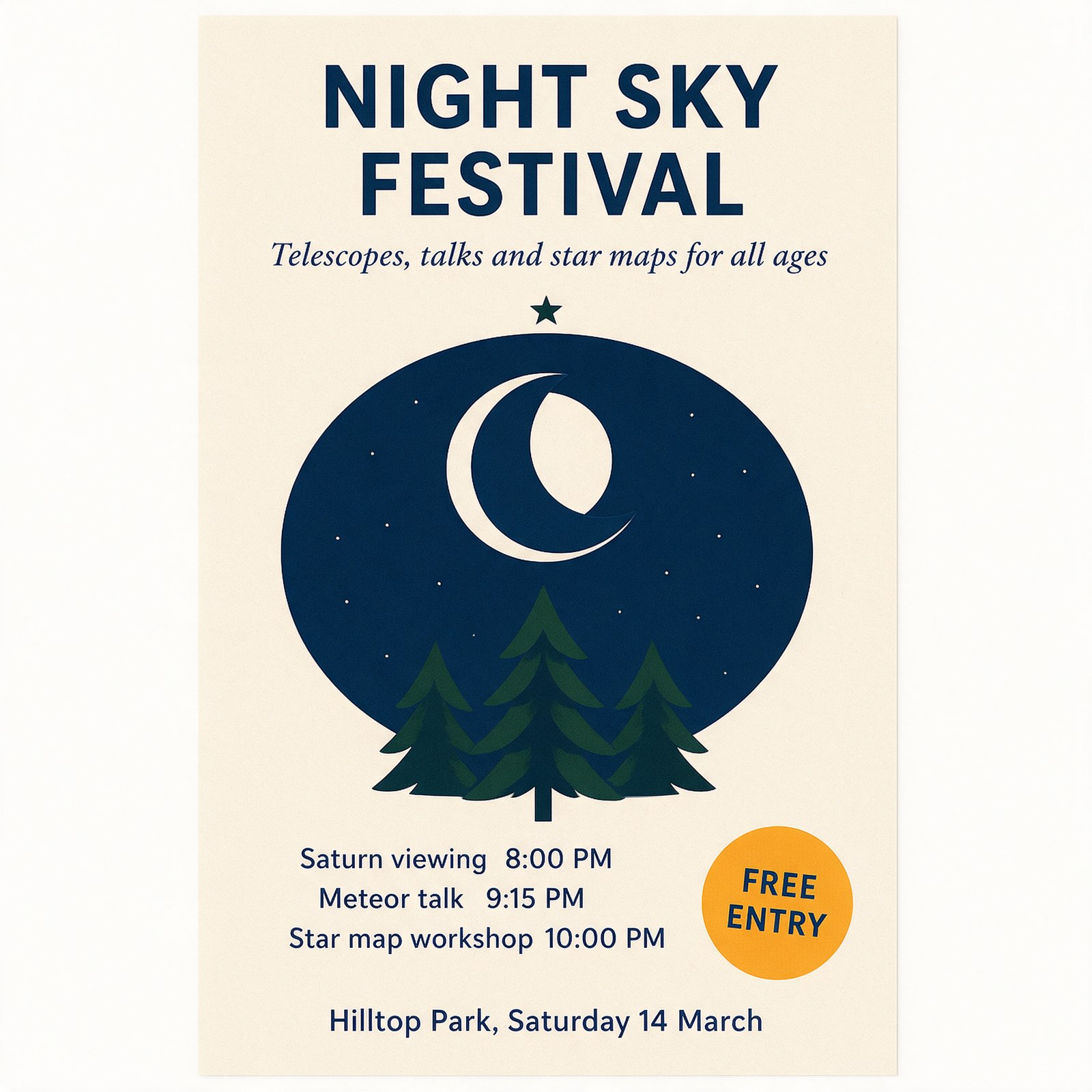
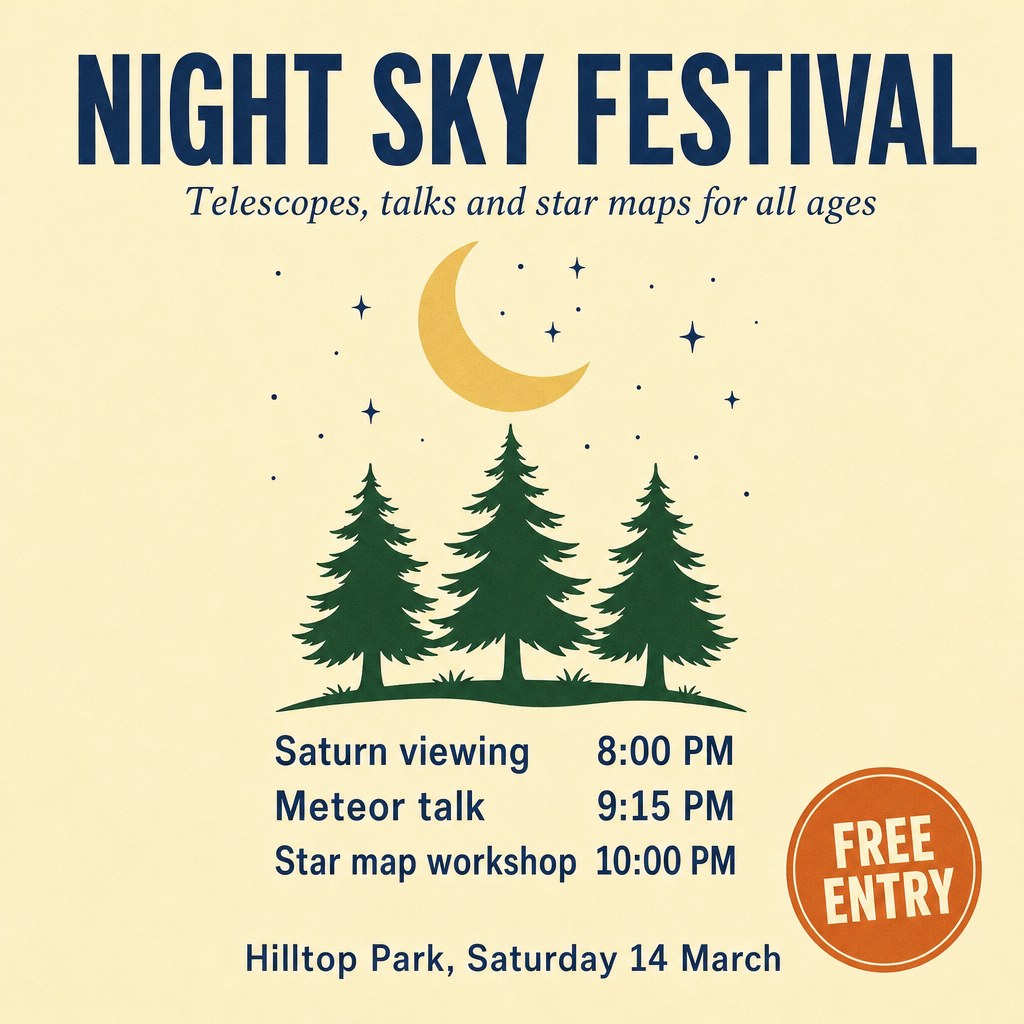
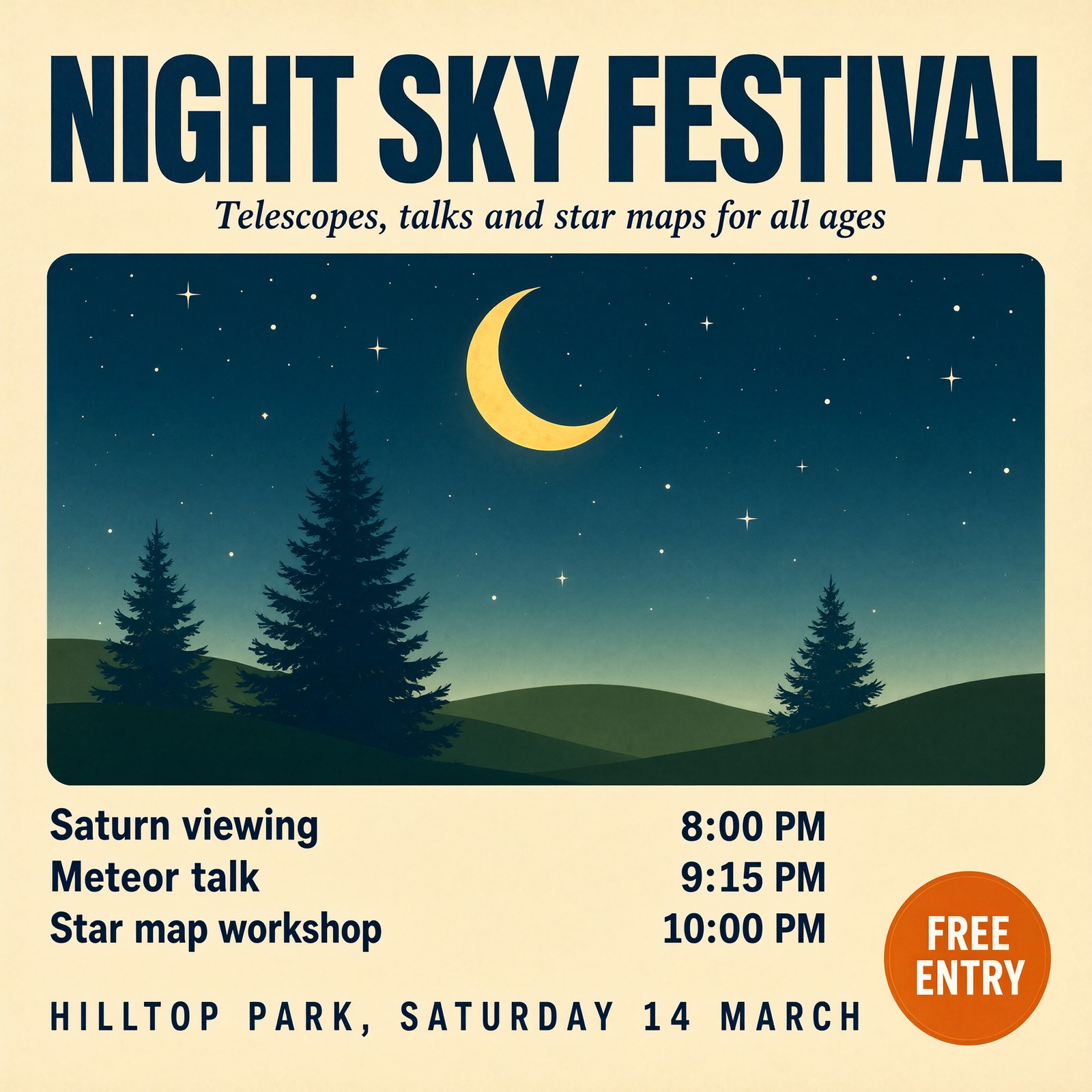
| Text block | Seedream 5.5 | Seedream 5.0 Pro | GPT Image 2 | Qwen Image 2.1 |
|---|---|---|---|---|
| NIGHT SKY FESTIVAL | As written | As written | As written | As written |
| Telescopes, talks and star maps for all ages | As written | As written | As written | As written |
| Saturn viewing 8:00 PM | As written | As written | As written | As written |
| Meteor talk 9:15 PM | Reads "9:15 10 PM" | As written | As written | As written |
| Star map workshop 10:00 PM | As written | As written | As written | As written |
| Hilltop Park, Saturday 14 March | As written | As written | As written | Correct words, set in capitals |
| FREE ENTRY | As written | As written | As written | As written |
Test 2: nine details in one scene
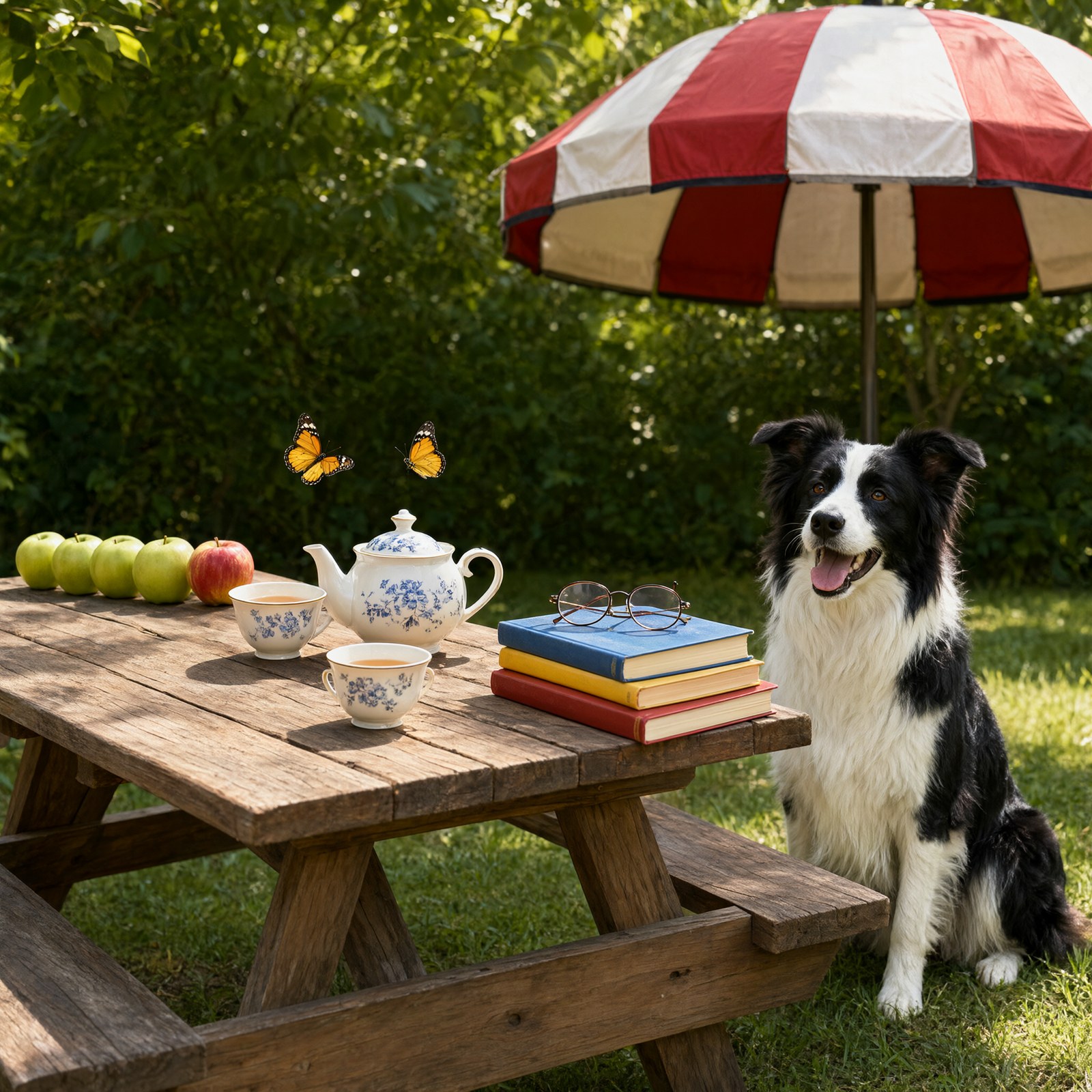
Prompt: A wooden picnic table on a green lawn, photographed in soft afternoon light from a slightly raised angle. On the left side of the table, four green apples sit in a row, with one red apple at the right end of the row. In the middle of the table stands a white teapot with a blue teacup on each side of it. On the right side of the table is a stack of three books: red on the bottom, yellow in the middle and blue on top, with a pair of round reading glasses lying on the blue book. Two yellow butterflies hover above the teapot. A black and white dog sits on the grass to the right of the table. Behind the table stands a red and white striped parasol.
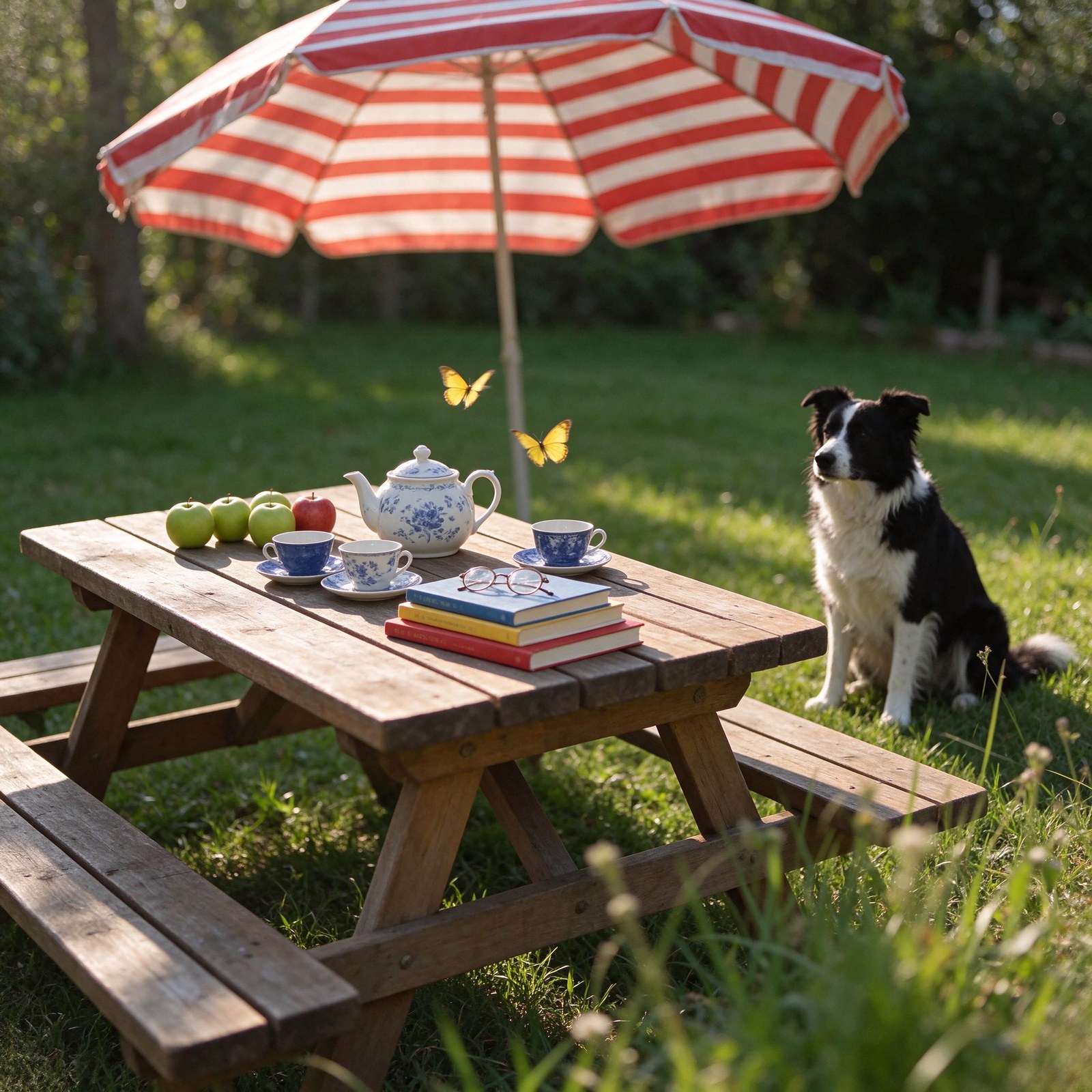
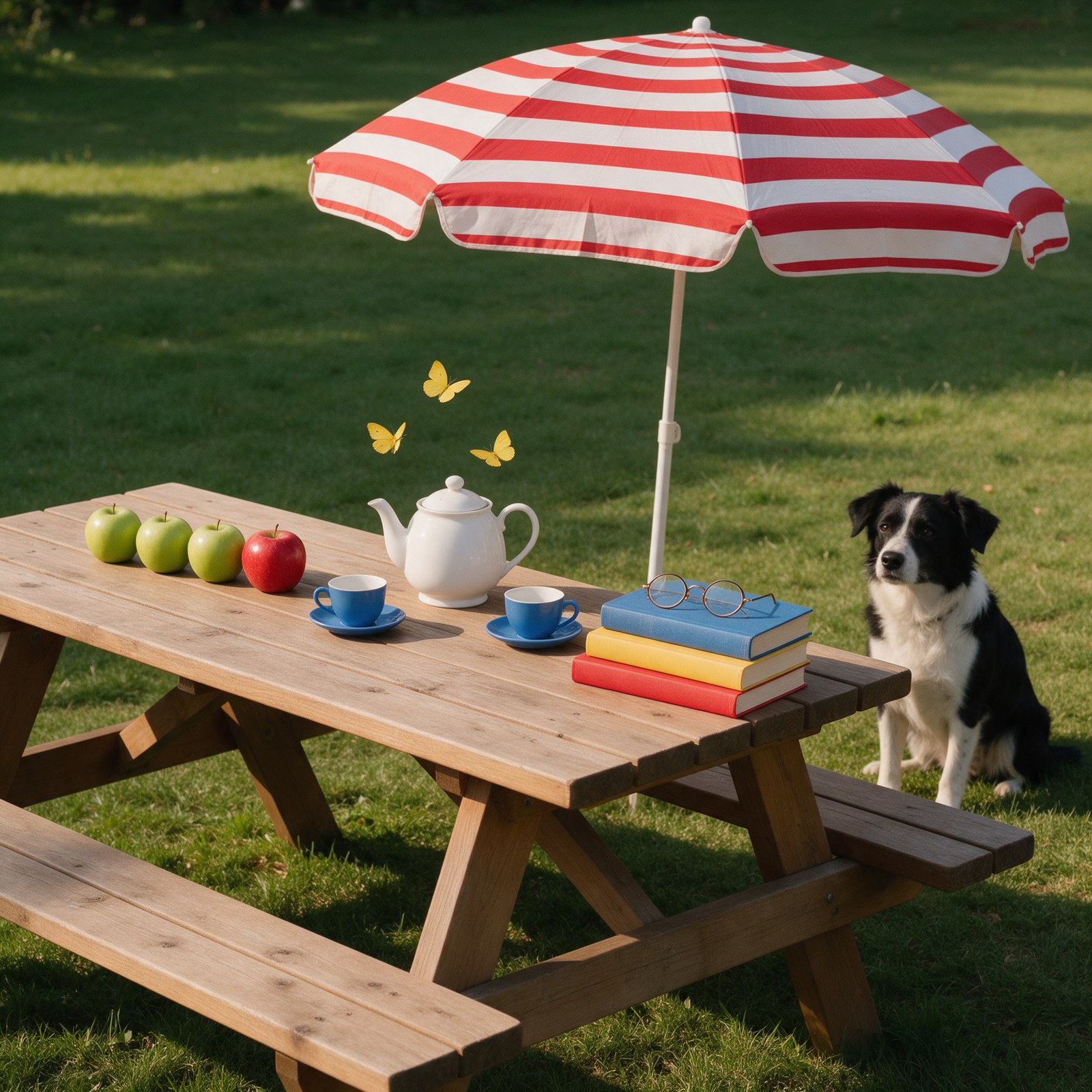
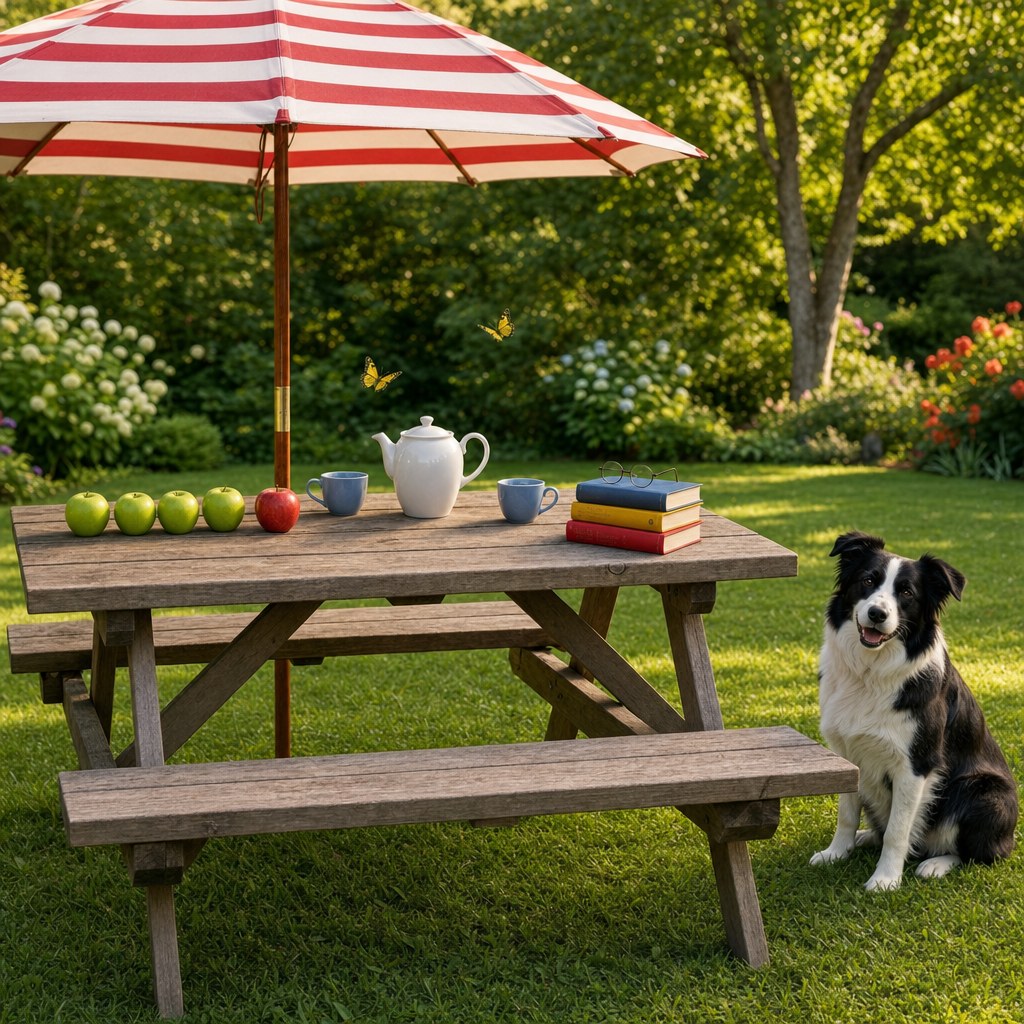
| Requested detail | Seedream 5.5 | Seedream 5.0 Pro | GPT Image 2 | Qwen Image 2.1 |
|---|---|---|---|---|
| Four green apples in a row | Yes, one set behind the row | Three green apples | Yes | Yes |
| One red apple at the right end | Yes | Yes | Yes | Yes |
| White teapot in the middle | Yes, with a blue floral pattern | Yes | Yes | Yes, with a blue floral pattern |
| A blue teacup on each side of the teapot | Three cups, two on the left and one on the right | Yes | Yes | Two white cups with a blue pattern, one on the left and one in front |
| Three books, red, yellow and blue from the bottom | Yes | Yes | Yes | Yes |
| Round reading glasses on the blue book | Yes | Yes | Yes | Yes |
| Two yellow butterflies above the teapot | Yes | Three butterflies | Yes | Two, orange-yellow with black borders |
| Black and white dog sitting to the right of the table | Yes | Yes | Yes | Yes |
| Red and white striped parasol behind the table | Yes | Yes | Yes | Yes, red and cream |
Test 3: brass, glass, wool and walnut up close
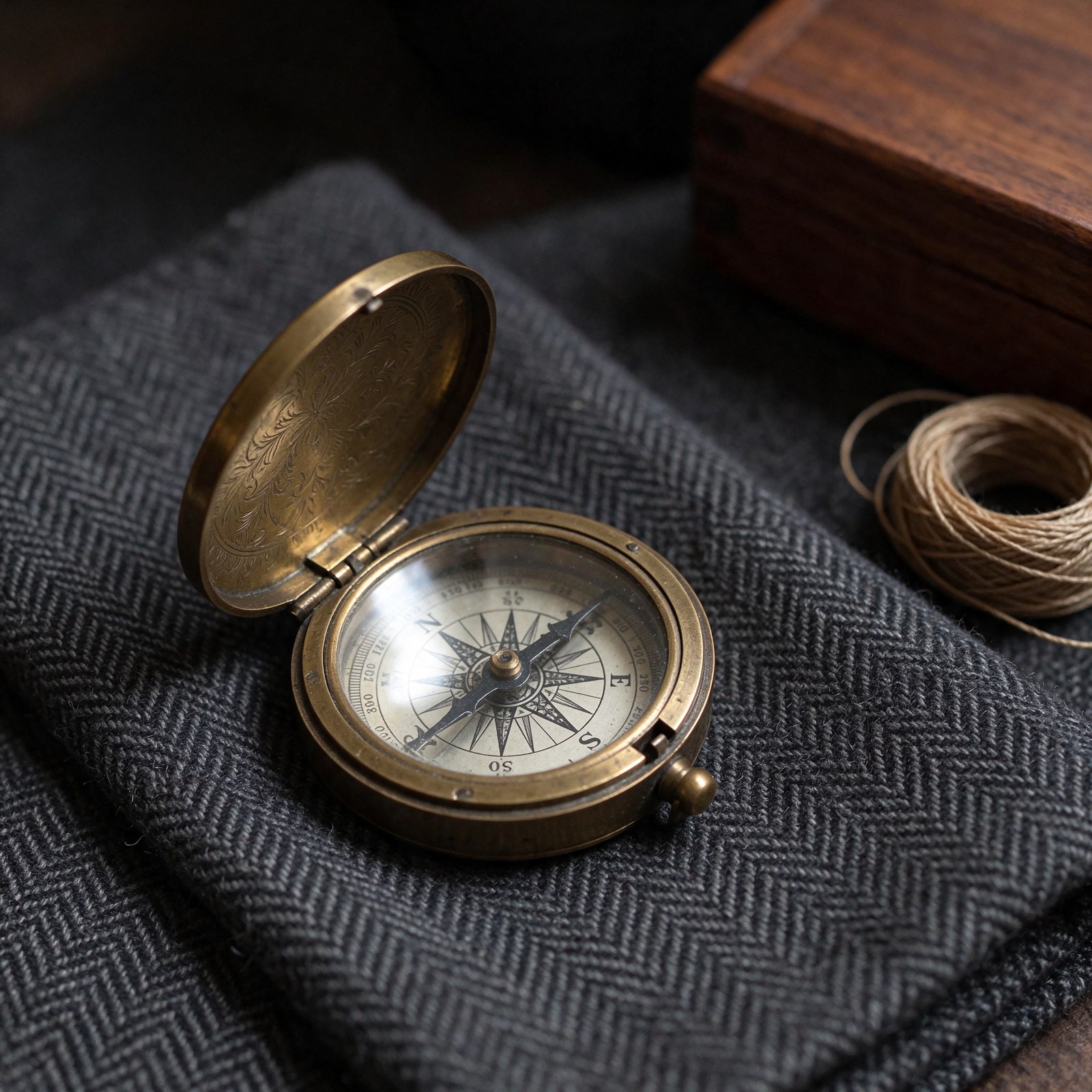
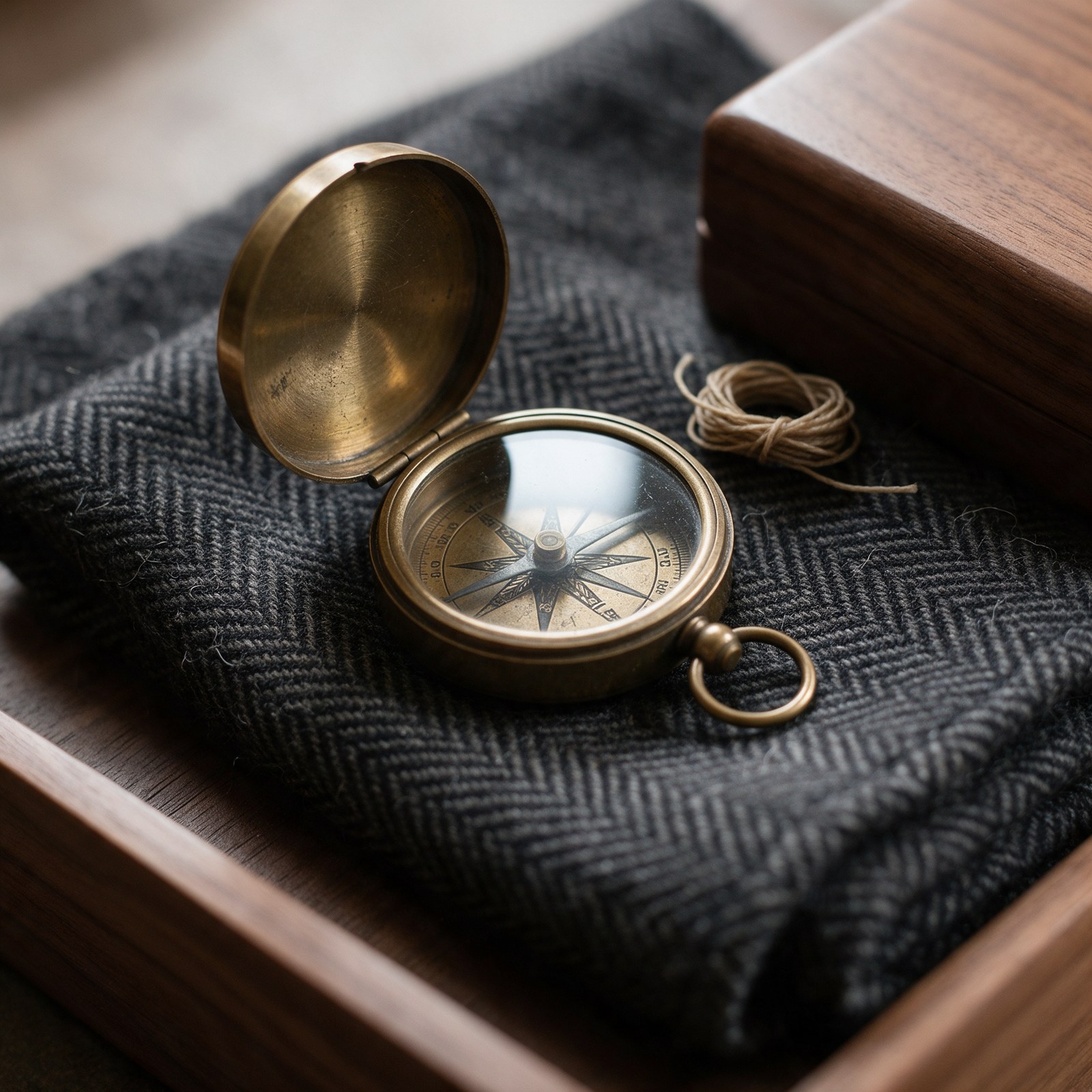
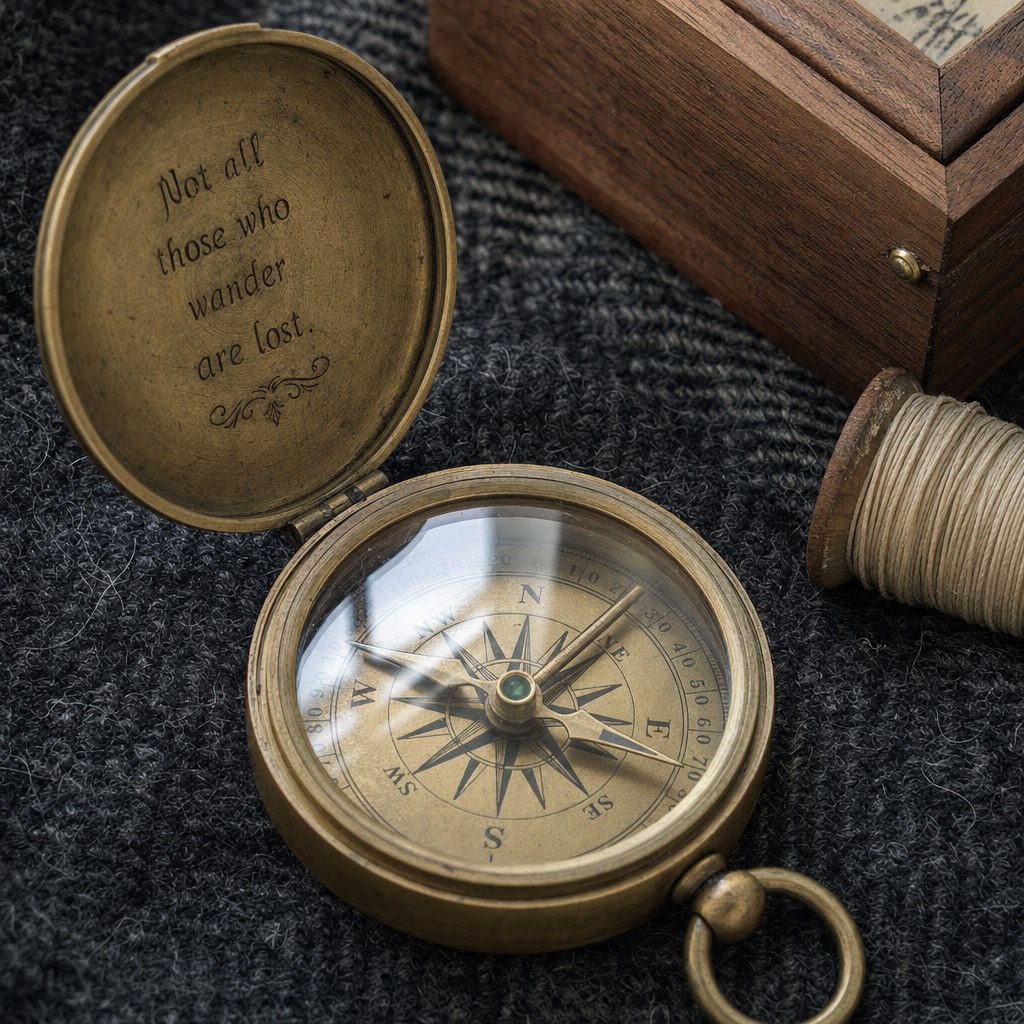
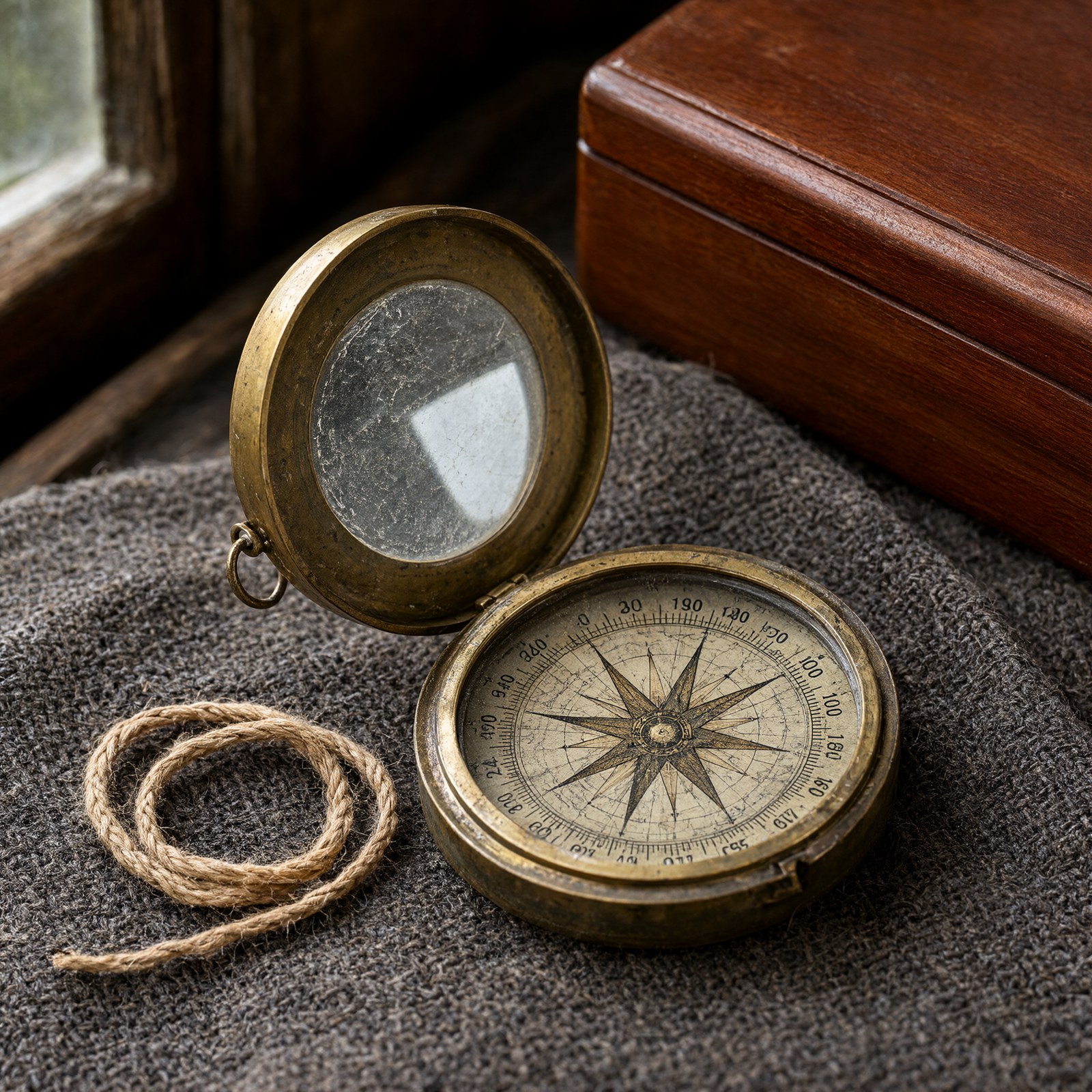
Prompt: Macro photograph of an antique brass pocket compass lying open on a folded charcoal herringbone wool cloth, beside a small coil of waxed linen thread and the corner of a walnut wood box. The brass shows worn edges, fine scratches and darker patina in the engraved recesses. The compass glass is slightly scuffed and reflects a bright window. The wool shows its herringbone weave and loose fibers, and the walnut shows open grain under a satin finish. Soft daylight from the left, shallow depth of field, 100mm macro lens.
Specs at a glance
| Seedream 5.5 | Seedream 5.0 Pro | GPT Image 2 | Qwen Image 2.1 | |
|---|---|---|---|---|
| Maker | ByteDance | ByteDance | OpenAI | Alibaba Cloud |
| Inputs and modes | Text to image, editing and fusion, marker and coordinate edits, layer decomposition | Text to image, editing and fusion, marker and coordinate edits, layer decomposition | Text to image, editing and compositing | Text to image, editing and reference-guided generation |
| Reference images | Up to 10 | Up to 10 | Up to 16 | Up to 10 |
| Output sizes | 1K, 1.5K and 2K tiers, or an exact size from 0.92MP to 4.62MP | 1K, 1.5K and 2K tiers, or a custom width and height | 1024x1024, 1536x1024 or 1024x1536 | 1K and 2K tiers, or an exact size from 512x512 to 2560x2560 in total area |
| Quality controls | quality: 1K, 1.5K, 2K | quality: 1K, 1.5K, 2K; prompt optimization: standard or fast | quality: low, medium, high | Pro or Turbo variant; resolution: 1K, 2K |
| Images per request | 1 (a decomposition returns the base image and its layers) | 1 (a decomposition returns the base image and its layers) | 1 to 4 | 1 to 6 |
| Transparent output | Yes, from a prompt alone or from up to 10 references, as PNG | From one input image that already has an alpha channel, as PNG | No | Yes, as PNG, with prompt_extend set to false |
| Layer decomposition | Base image plus up to 99 layers, with text recognition | Base image plus up to 16 layers | No | No |
| Billing | Per image at two size tiers, plus each input image | Per image at two size tiers, plus each input image after the first | Per image at three quality tiers | Per image at the Pro or Turbo rate; reference images are not billed |
How we ran it
Each model received the identical prompt for each test, one request per model per prompt, through POST /v1/images/generations with "sync": true on November 13, 2026. Seedream 5.5 and Seedream 5.0 Pro ran with quality: "2K" and aspect_ratio: "1:1", and Qwen Image 2.1 with resolution: "2K" and aspect_ratio: "1:1" on its default Pro variant. GPT Image 2 has no 2K setting, so it ran at its highest quality tier, quality: "high", with size: "1024x1024", its square size. Every other setting stayed at its default, including Qwen Image 2.1's prompt extension, which is on by default. All twelve requests returned an image on the first attempt; none was retried, edited or picked. Images are shown as returned, scaled to at most 1600 pixels on a side and saved as JPEG. Times are wall-clock seconds from sending a request to receiving the finished image, with up to four requests running at once, and vary with load.
| Seedream 5.5 | Seedream 5.0 Pro | GPT Image 2 | Qwen Image 2.1 | |
|---|---|---|---|---|
| Settings | quality 2K, aspect_ratio 1:1 | quality 2K, aspect_ratio 1:1 | quality high, size 1024x1024 | resolution 2K, aspect_ratio 1:1, Pro variant |
| Output size | 2048x2048 | 2048x2048 | 1024x1024 | 2048x2048 |
| Test 1 time | 32 seconds | 74 seconds | 92 seconds | 35 seconds |
| Test 2 time | 43 seconds | 50 seconds | 117 seconds | 36 seconds |
| Test 3 time | 27 seconds | 58 seconds | 115 seconds | 37 seconds |
What to look for
Text. All four laid out the seven blocks in the requested order: headline, italic subtitle, illustration, three-line schedule, footer line and a round badge in the bottom right corner. Seedream 5.5 inserted "10" into the second time, so the line reads "Meteor talk 9:15 10 PM". Qwen Image 2.1 spelled every word but set the footer in letter-spaced capitals. Seedream 5.0 Pro drew the poster as a portrait sheet centered on a white background instead of filling the square, and colored the badge yellow-orange.
Prompt following. GPT Image 2 placed all nine requested details. Seedream 5.5 added a third teacup. Seedream 5.0 Pro drew three green apples instead of four and three butterflies instead of two. Qwen Image 2.1 made both cups white with a blue pattern, set one in front of the teapot instead of on its right, and colored the butterflies orange-yellow with black borders. Seedream 5.5 and Qwen Image 2.1 also gave the white teapot a blue floral pattern.
Materials. Seedream 5.5 engraved the lid with a fine floral pattern, dark in the recesses, and rendered a clear herringbone weave with loose fibers, a coil of waxed thread and open walnut grain. Seedream 5.0 Pro also rendered a clear herringbone weave and put fine scuffs and a window reflection in the glass, but left the lid plain brushed brass. GPT Image 2 reflected a window frame in the glass and engraved a line of text inside the lid that the prompt did not ask for; its thread is wound on a spool. Qwen Image 2.1 gave the brass the heaviest wear and placed a scratched glass in the lid that reflects the window, but its cloth has no herringbone pattern and its thread is a loose loop of twine. On the compass dial, GPT Image 2 labeled all eight points in order; the Seedream dials have irregular or unreadable markings, and the Qwen Image 2.1 dial has no needle and repeats its numbers.
When to use each
- Seedream 5.5 for transparent images from a prompt or from references, layer decomposition into up to 99 layers with text recognition, and marker or coordinate edits, at a lower per-image rate than Seedream 5.0 Pro.
- Seedream 5.0 Pro for work already built on it, or when you want its fast prompt optimization mode, which reduces latency with slightly lower image quality.
- GPT Image 2 for edits and composites from up to 16 reference images and up to four images per request, at three quality tiers. It is scheduled for retirement on February 9, 2027.
- Qwen Image 2.1 for up to six images per request, a lower-priced Turbo variant, exact sizes up to 2560x2560 in total area, and reference images that are not billed.
Generate with Seedream 5.5 on EmpirioLabs
curl -X POST https://api.empiriolabs.ai/v1/images/generations \
  -H "Authorization: Bearer $EMPIRIOLABS_API_KEY" \
  -H "Content-Type: application/json" \
  -d '{
    "model": "seedream-5-5",
    "prompt": "A flat vector-style event poster on cream paper with the headline NIGHT SKY FESTIVAL in bold navy capitals",
    "quality": "2K",
    "aspect_ratio": "1:1",
    "sync": true
  }'
The finished image is in data[0].url. Swap model to seedream-5-0-pro, gpt-image-2 or qwen-image-2-1 to run the same request on the others: for gpt-image-2, send quality as low, medium or high with size in place of aspect_ratio, and for qwen-image-2-1, send resolution: "2K" in place of quality. You can also try Seedream 5.5 in the playground. For transparent images, layer decomposition and edits, see How to Use the Seedream 5.5 API.
Frequently asked questions
Were the images edited, retried or picked?
No. Each image is the first and only one the model returned for that prompt. All twelve requests returned an image on the first attempt, and the images are shown unedited apart from scaling and JPEG conversion.
Which models spelled the poster text correctly?
Seedream 5.0 Pro, GPT Image 2 and Qwen Image 2.1 spelled all seven text blocks correctly; Qwen Image 2.1 set the footer line in capitals. Seedream 5.5 rendered six of the seven as written and added a stray "10" to "Meteor talk 9:15 PM".
What does Seedream 5.5 add over Seedream 5.0 Pro?
Seedream 5.5 makes transparent images from a prompt alone or from up to 10 reference images that need no alpha channel, where Seedream 5.0 Pro needs one input image that already has one. It splits an image into a base image plus up to 99 layers, against 16, and can return the text of printed text layers. Both take up to 10 reference images and offer 1K, 1.5K and 2K tiers, and Seedream 5.5 has the lower per-image rate at both size tiers.
Why is the GPT Image 2 result 1024x1024?
GPT Image 2 has no 2K setting. Its sizes are 1024x1024, 1536x1024 and 1024x1536, so the square test used 1024x1024 at its highest quality tier, high.
Which model has the lowest per-image rate at these settings?
Qwen Image 2.1 on its default Pro variant, followed by Seedream 5.5 at 2K, Seedream 5.0 Pro at 2K and GPT Image 2 at high quality. Current rates are on each model page and on the pricing page.